![OXFORD_GLOBAL-LOGO_SYMBOL 500px.png]](https://lp.oxfordglobal.co.uk/hs-fs/hubfs/OXFORD_GLOBAL-LOGO_SYMBOL%20500px.png?height=40&name=OXFORD_GLOBAL-LOGO_SYMBOL%20500px.png)
Sickness - notification procedure
If a staff member is unable to attend work due to sickness, they should notify their Manager prior to their usual start time, either by phone call, text message, Teams message, or email. They should give a reason for the sickness absence. If they are still feeling unwell the following day, they should update their manager, so they know the staff member is still not working. The should ensure this is done for each consecutive day they are off sick until they are well enough to work.
The staff member should also record their sick leave in BreatheHR. On the first day of sickness, they should create a new sick leave entry in the system – they should not add an end date, this should only be added when they return to work.
Recording sick leave in BreatheHR
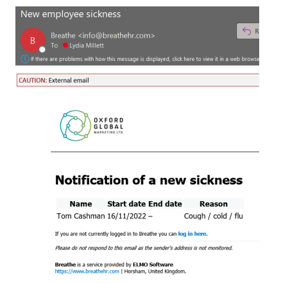
1. If an employee is taking the day off sick, you’ll receive an email notifying you. Click the link to login to Breathe to view the entry:
2. Ensure that the employee has updated their Teams status (so other staff are aware). If any employee has notified you outside of Breathe (e.g. text, call, Teams message), ensure that they have also submitted the Breathe form.
3. There is nothing else to do during their sick leave. If the employee needs to take more than one day sick, they should notify you but nothing needs to be updated on Breathe until they return.
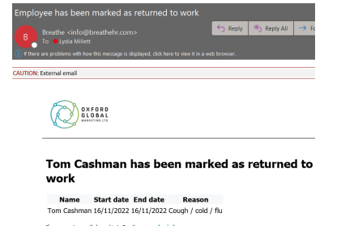
4. When the employee returns to work, they should mark this on Breathe – you will receive an email notifying you of this. Login to Breathe by clicking the link:
5. You should see the completed sick leave on your Managers Dashboard. Click the arrow:

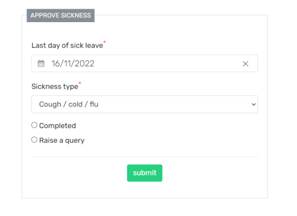
6. You can then review the sick leave, and complete (if all info is correct). If there is an issue (incorrect dates, insufficient information, fit note is required etc), click “Raise a query” and submit a reason. This will then go back to the employee who can adjust and resubmit where needed.
Employee Handbook - sick leave / wider Time Off policies
For more information on our Company sick leave policy (as well as our other Time Off policies), please refer to our Employee Handbook (Time Off policies - pages 21 to 30).