![OXFORD_GLOBAL-LOGO_SYMBOL 500px.png]](https://lp.oxfordglobal.co.uk/hs-fs/hubfs/OXFORD_GLOBAL-LOGO_SYMBOL%20500px.png?height=40&name=OXFORD_GLOBAL-LOGO_SYMBOL%20500px.png)
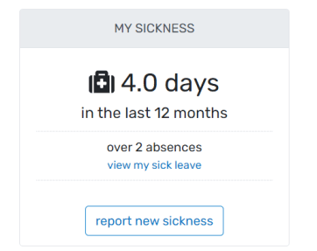
1. In the morning prior to your usual start time, log into Breathe and select “Report New Sickness” on your Dashboard:
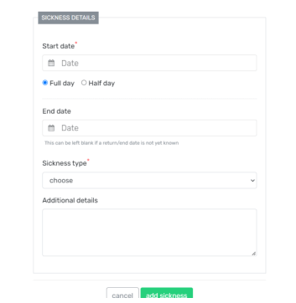
2. Complete the sickness form to mark you as off sick – do not add an end date, this should only be added when you return to work. This will trigger an email to your manager to inform them you are sick:
3. Update your Teams status so other staff members are aware you are not working.
4. Do not work during your sick leave. This is to ensure you get adequate rest and are looking after your wellbeing. The company can also be investigated by HMRC if staff are working whilst marked as off sick.
5. If you are still feeling unwell the following day, update your manager (by either Teams message, call, text etc) so they know you are still not working. Ensure this is done for each consecutive day you are off sick until you are well enough to work. There is nothing to update/change on Breathe during this time.
6. When you return to work, log into Breathe and select “Mark Return to Work” on your Dashboard:

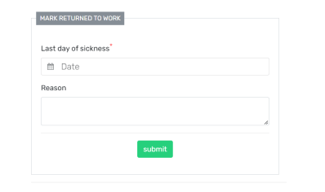
7. Add in the day you came back to work, a reason if applicable and click submit:
8. Your manager will review your sick leave and either approve or raise a concern (e.g. a doctor’s note is required).
Self-certification / fit note
If you're off work sick for more than 7 calendar days (this includes non-working days – e.g., weekend and Bank Holidays), you will be asked to provide a fit note (or Statement of Fitness for Work) from a healthcare professional. Fit notes are sometimes referred to as medical statements or a doctor's note.
The Company may request a doctor’s certificate for frequent periods of absence of less than seven calendar days. Any costs in obtaining the certificate in these circumstances will be reimbursed by the Company.
Employee Handbook - sick leave policy / wider Time Off policies
For more information on our Company sick leave policy (as well as our other Time Off policies), please refer to our Employee Handbook (Time Off policies - pages 21 to 30).