![OXFORD_GLOBAL-LOGO_SYMBOL 500px.png]](https://lp.oxfordglobal.co.uk/hs-fs/hubfs/OXFORD_GLOBAL-LOGO_SYMBOL%20500px.png?height=40&name=OXFORD_GLOBAL-LOGO_SYMBOL%20500px.png)
If you have a medical condition or disability we strongly encourage you to inform your manager and HR – so that we can talk it through with you and consider any additional support or reasonable adjustments that you might need to help you perform your role.
Please record any medical facts on BreatheHR – (visit your profile -> ‘More’ –> ‘Medical Facts’).
1) Log in to BreatheHR & visit your Profile. Once on your Profile, click on the 'More' dropdown tab on the right of the screen:

2) On clicking the dropdown, select 'Medical Facts':
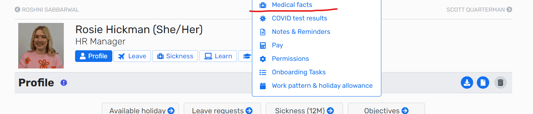
3) In the Medical Fact section, you can click the + sign to add the details of any medical facts:

4) Fill out the areas shown below in as much detail as you can & then click 'add medical fact details':
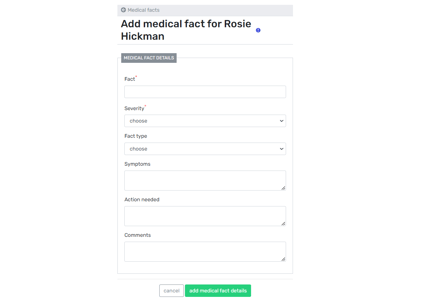
5) When a medical fact is added to the system, a notification is sent to HR - who will then arrange an informal meeting with you to talk through your medical condition and any additional support that you might need.
For more information on how the company can support you with a medical condition, please visit the 'Time Off' section of our employee handbook (pages 21-30) as well as the wellbeing section of Knowledge Hub.